
Finally! Build a Complete CIM in Minutes with our Breakthrough AI CIM Generator
Investment banks burn hundreds of analyst hours on every Confidential Informatio
n Memorandum before a single buyer ever sees the document. Many hours are required to review the analyst’s work through tedious back and forth interactions. The process is slow, repetitive, and expensive at a time when your team should be focused on closing deals.
InfoGate AI changes that entirely. Upload your financial statements, management summaries, and supporting materials and the platform generates a fully structured CIM automatically. Your analysts review, refine, and export directly to PowerPoint ready for buyer outreach.

The Breakthrough Platform for Building Deal Ready CIMs in Minutes
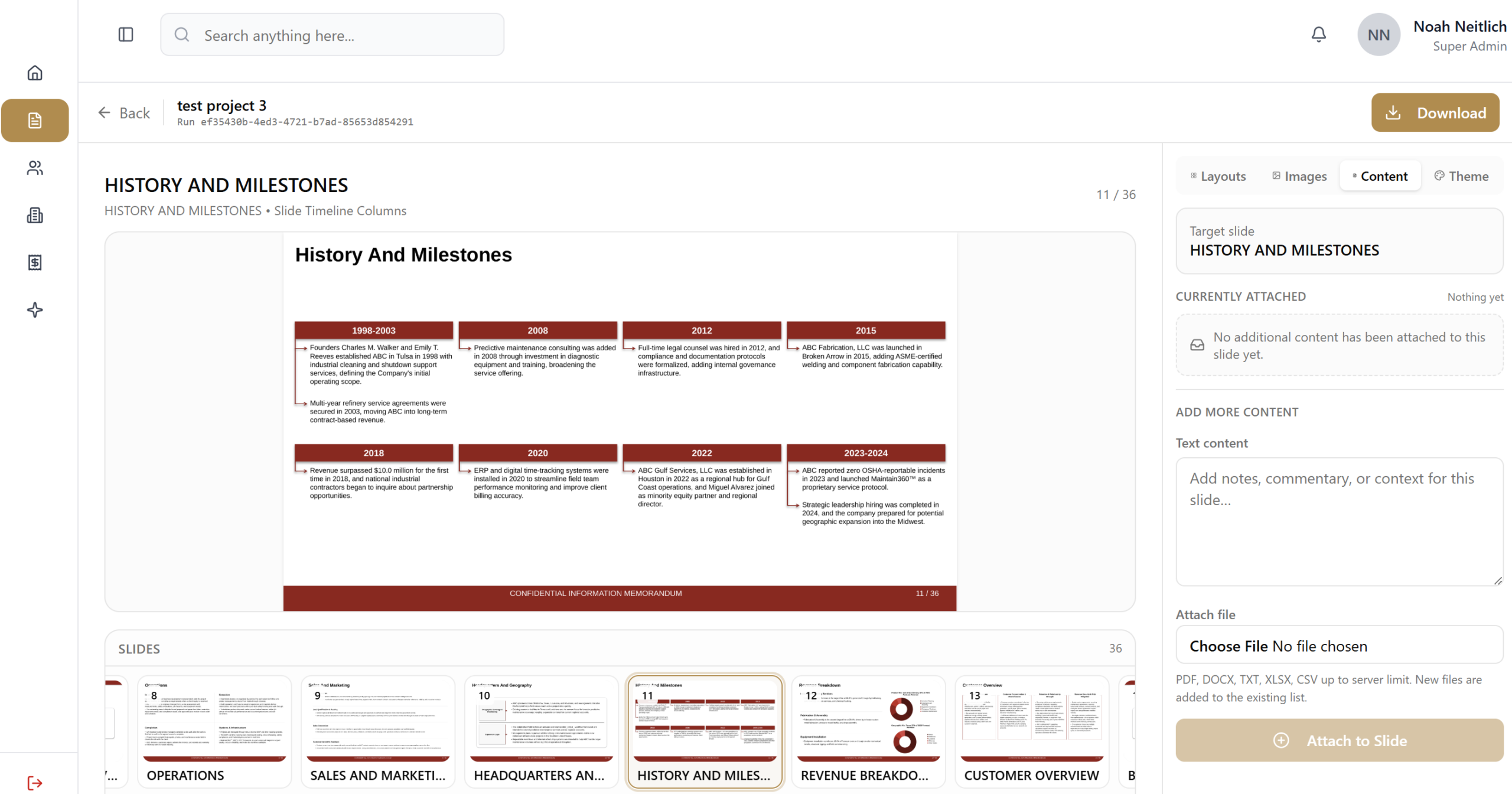
InfoGate Financial is the first ever AI CIM generation platform built to feel like magic. Upload your deal materials and watch the platform instantly transform scattered files into a fully structured, institutionally formatted CIM draft in minutes. What once took analysts weeks can now happen almost instantly.
Your analysts stay fully in control while the platform handles the heavy lifting behind the scenes. Teams can review, refine, and export directly into editable PowerPoint presentations while eliminating hundreds of hours of repetitive drafting and formatting work.
Instead of starting from a blank page, your team begins with a professional deal ready presentation already built. Managing Directors get their time back. Analysts focus on execution instead of slide creation. Firms move faster, launch processes earlier, and operate with a level of leverage that was impossible before AI.
The future of CIM creation is here, and the first time you see it work, it feels incredible.
Build a Complete Confidential Information Memorandum in Minutes

Investment banks shouldn’t lose momentum on a deal while waiting weeks for a Confidential Information Memorandum (CIM) to be built. The faster you get in front of buyers, the more competitive your process becomes.
InfoGate Financial generates a fully structured CIM in minutes at a fraction of the cost of building one from scratch. The platform organizes your deal notes and materials into a complete presentation exactly aligned with how investment banks actually present opportunities.
Your analysts stay in control the entire time. They review the sections, refine the messaging, and export directly to PowerPoint using the workflow they already follow.
Instead of starting from a blank page and wasting days on formatting, your team begins with a finished presentation. Managing Directors can finally focus on client relationships instead of wasting hundreds of hours editing slides.
As timelines compress, your team moves to market faster and runs a tighter process. InfoGate Financial handles the heavy lifting of the deal process so your team can focus on closing more deals.
How the AI CIM Generator Works
From raw company information to a fully built Confidential Information Memorandum in minutes. The platform is structured around real deal teams, with defined seat types and a simple workflow from input to output.
Step 1:
Assign Seat Types and Set Up Your Team
Step 2:
Create a New CIM Project
Step 3:
Generate Your CIM Literally in Seconds
Step 4:
Customize Your Output
Step 5:
Review, Iterate, and Export
The full CIM is generated in a few minutes and can be refined in multiple ways. You can create new iterations for different buyer groups or Managing Director edits, use the built in AI assistant to adjust writing and slide design, or export directly to PowerPoint.
Step:1
- Assign Seat Types and Set Up Your Team
When your organization purchases access, seats are created within your account and assigned to users. There are two seat types: Managing Director seats and Analyst seats. Managing Director seats have full visibility across all projects and can assign analysts to specific CIMs. Analyst seats can only access projects they create or are assigned to, keeping deal flow organized and controlled.
Step:2
- Create a New CIM Project
Starting a project is simple. Analysts upload notes, financials, and supporting documents into a secure environment and organize them into standard CIM sections. The platform mirrors the exact structure used in live deal processes, allowing teams to move quickly without reformatting or rebuilding materials. You can also align your due diligence requests to match this structure, making it easier to collect information from clients and turn it into a CIM with minimal friction.
Step:3
- Generate Your CIM
Once your materials are organized, you generate the CIM in one click. You can choose to generate as much or as little of the CIM as needed, from individual slides to a full presentation. The platform asks you to define the target buyer type such as Institutional, Family Office, Strategic, or Lenders, and then prompts additional questions to refine positioning. You can also include custom slides by adding your own prompts and inputs, giving you full control over how your presentation is structured.
Step:4
- Customize Your Output
You can define how each slide is generated by setting custom prompts for every CIM slide type, ensuring the output matches your firm’s style and expectations every time. If preferred, you can rely on the built in prompts to follow standard best practices used across live deals.
Step:5
- Review, Iterate, and Export
The full CIM is generated in a few minutes and can be refined in multiple ways. You can create new iterations for different buyer groups or Managing Director edits, use the built in AI assistant to adjust writing and slide design, or export directly to PowerPoint for final
How the AI CIM Generator Works
From raw company information to a fully built Confidential Information Memorandum in minutes. The platform is structured around real deal teams, with defined seat types and a simple workflow from input to output.
Step:1
- Assign Seat Types and Set Up Your Team
When your organization purchases access, seats are created within your account and assigned to users. There are two seat types: Managing Director seats and Analyst seats. Managing Director seats have full visibility across all projects and can assign analysts to specific CIMs. Analyst seats can only access projects they create or are assigned to, keeping deal flow organized and controlled.
Step:2
- Create a New CIM Project
Starting a project is simple. Analysts upload notes, financials, and supporting documents into a secure environment and organize them into standard CIM sections. The platform mirrors the exact structure used in live deal processes, allowing teams to move quickly without reformatting or rebuilding materials. You can also align your due diligence requests to match this structure, making it easier to collect information from clients and turn it into a CIM with minimal friction.
Step:3
- Generate Your CIM
Once your materials are organized, you generate the CIM in one click. You can choose to generate as much or as little of the CIM as needed, from individual slides to a full presentation. The platform asks you to define the target buyer type such as Institutional, Family Office, Strategic, or Lenders, and then prompts additional questions to refine positioning. You can also include custom slides by adding your own prompts and inputs, giving you full control over how your presentation is structured.
Step:4
- Customize Your Output
You can define how each slide is generated by setting custom prompts for every CIM slide type, ensuring the output matches your firm’s style and expectations every time. If preferred, you can rely on the built in prompts to follow standard best practices used across live deals.
Step:5
- Review, Iterate, and Export
The full CIM is generated in a few minutes and can be refined in multiple ways. You can create new iterations for different buyer groups or Managing Director edits, use the built in AI assistant to adjust writing and slide design, or export directly to PowerPoint for final
The Problem
Enjoy Exponential Productivity Gains By Eliminating the Time Spent Building CIMs
Preparing transaction materials is a massive undertaking for any deal team. Analysts spend late nights repeating a process that follows nearly identical structures across every deal, consuming hundreds of hours that should be spent on higher-value work.
A single Confidential Information Memorandum (CIM) typically demands over one hundred hours of manual labor before it is ready for buyers. When revisions are needed, those hours compound quickly, dragging the entire team into a cycle of constant formatting.
InfoGate Financial eliminates that bottleneck. By generating a complete first draft automatically, your team starts ahead of the process instead of buried in it. The platform enables seamless editing and real-time changes, ensuring your materials stay market-ready as the deal evolves.
Traditional CIM
InfoGate AI Platform
- 100+ analyst hours per CIM
- Complete CIM in 5–7 minutes
- Tedious back-and-forth revisions
- AI chatbot for instant revisions
- Manual formatting
- Auto-generated financials
- Restart from scratch on updates
- Regenerate slides on demand
100+ Hours
5–7 Minutes
The Solution
Eliminate the High Cost of Manual CIM Assembly
Building a CIM shouldn’t be a financial burden on the deal. InfoGate Financial fundamentally changes the economics of transaction materials, delivering a completed presentation for less than $50 per CIM generated. This is a fraction of the cost of manual assembly or traditional outsourced writing.
Instead of burning hundreds of expensive analyst hours on formatting and structural setup, your team begins with a finished presentation. This shift allows Managing Directors to focus on client relationships and high-level positioning while keeping overhead remarkably low.
By removing the most repetitive and costly part of the process, your firm can move to market faster without the typical friction of production. You get a market-ready CIM delivered in minutes, ensuring your materials are always aligned with how the market expects opportunities to be shown.
Platform Features
Built For the Speed Of Modern Day Institutions
InfoGate Financial is engineered for the specific requirements of investment banks and business brokers. The platform follows the institutional structures of a professional sell-side process, ensuring the output aligns perfectly with what buyers expect to see in a CIM.
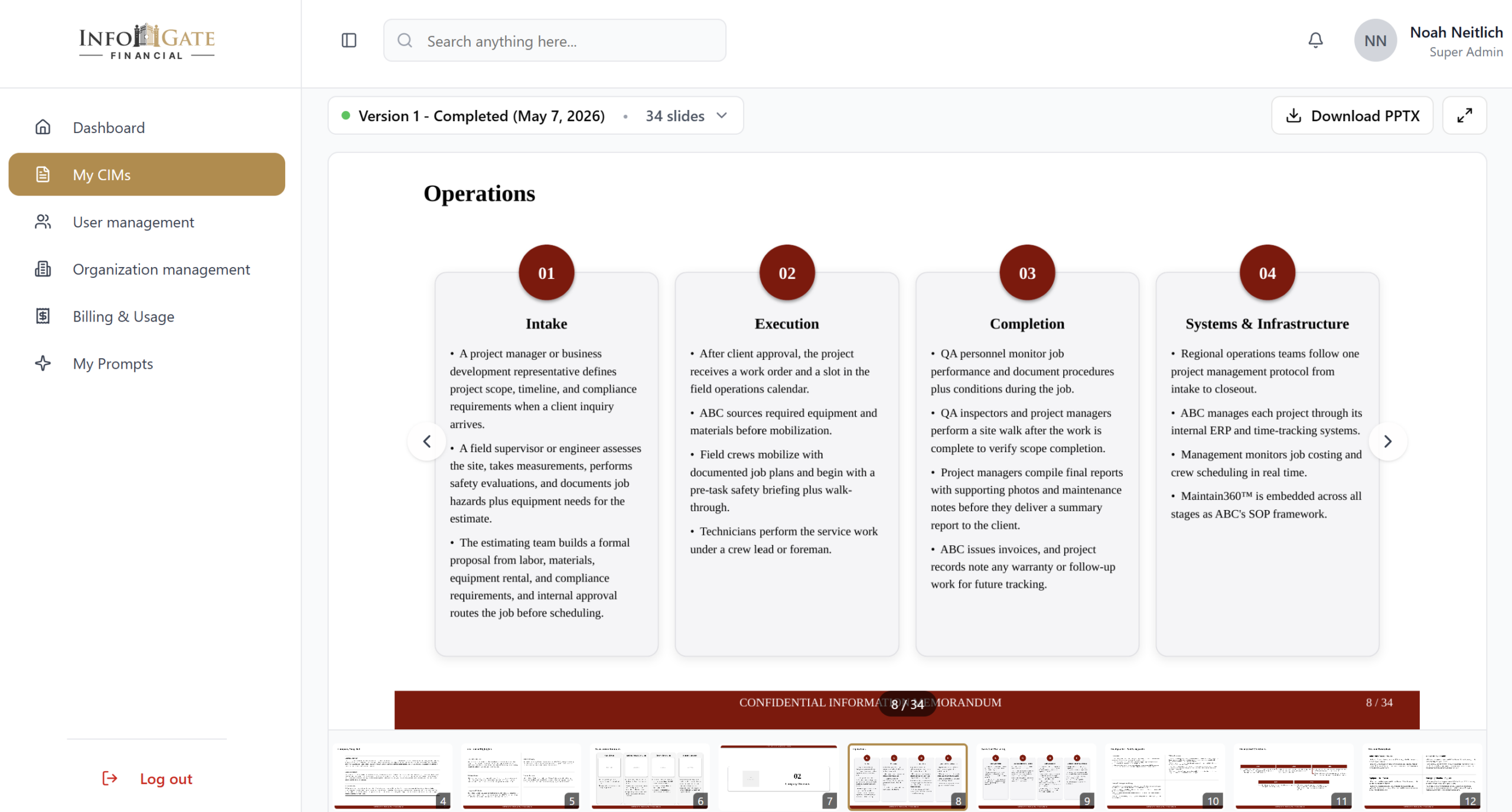
The platform functions as a editable workspace rather than a static generator. Analysts can use the integrated editor to refine narrative sections, instantly update slides as new data surfaces, and export the entire presentation directly to PowerPoint. This allows for total control over the final aesthetics and messaging without the burden of manual assembly.
By automating the structural heavy lifting, your team can move from engagement to buyer outreach in a fraction of the traditional timeline. You maintain the high professional standards the market demands while significantly reducing the time spent on administrative production.
By The Numbers
Hundreds of Analyst Hours Compressed Into 5-7 Minutes
Manual CIM production consumes a massive amount of deal team resources. A single analyst typically takes over one hundred hours drafting and formatting a CIM which represents a cost of roughly $5,000 in billable time per document. Across a full deal pipeline these hidden costs scale into the hundreds of thousands.
Slide Library
Generate Exactly the Slides Your Deal Needs
The platform gives deal teams the flexibility to generate a full CIM or produce individual sections based on where they are in the process. Analysts can create investment highlights, company overviews, market analysis, financial summaries, and management biographies on demand with charts, graphs, and financial tables built automatically from the data provided.
When new financial information becomes available, the presentation updates instantly without requiring the team to start over.

Investment Highlights

Company Overview

Market Analysis

Financial Summary

Management Biographies

Products & Services

Financial Exhibits

Transaction Overview
Slide Library
Generate the Exact Slides Your Deal Needs
The platform gives deal teams the flexibility to generate a full CIM or produce individual sections based on where they are in the process. Analysts can create the standard investment banking format on demand and built automatically from the data provided.
When new information becomes available, the presentation can be updated quickly without requiring the team to start over.
Executive Narrative
Company Overview
Products & Services
Macro Overview
Management Biographies
Financial Overivew
Security
Enterprise Security Built for Confidential Deal Data
The information inside your deal materials is among the most sensitive data in the market and InfoGate was built to protect it at every step of the process. All uploaded files are encrypted and stored within secure, protected infrastructure and only the specific content required for slide generation is ever processed.
Client data is fully isolated within each project so confidential information is never exposed across organizations. Your team can generate deal materials with complete confidence throughout every transaction.
AES-256 Encryption
All uploaded files and generated PPTX documents encrypted at rest on AWS S3.
Full Data Isolation
Every organization is fully isolated at the server level. No cross-client data access is possible.
TLS in Transit
All browser-to-server and service-to-service communication secured via industry-standard TLS.
Complete Deletion
Delete your data anytime — removed simultaneously from the database and AWS S3 with no copies left behind.
CIM Generated In
5–7 Minutes
Export Format
PowerPoint Ready
Security
AES-256 Encrypted
Live Demo
Build a Real CIM Live
The fastest way to understand what InfoGate Financial delivers for your firm is to watch it work on real materials. During the demo we will walk through the platform, upload company information, and generate a complete CIM using the same workflow your deal team would use from day one.
You will see how raw documents become a structured, buyer ready presentation in minutes and understand exactly how InfoGate fits into your existing deal process.
Not Ready for a Subscription? Let Us Create the CIM for You
If a platform subscription is not the right fit today, our team can generate the Confidential Information Memorandum for you. Provide the company information and supporting materials and we will deliver a professionally structured CIM ready for buyer review with no subscription required.
Individual CIMs are available for $500 per document.